Node:Cue

V1.1 Out nowOnly on Windows

Live audio show control. Plan the show, trigger sounds, and play background music, all from one application.

Cuelist / Pads / Playlist

Choose the playback view for the job.

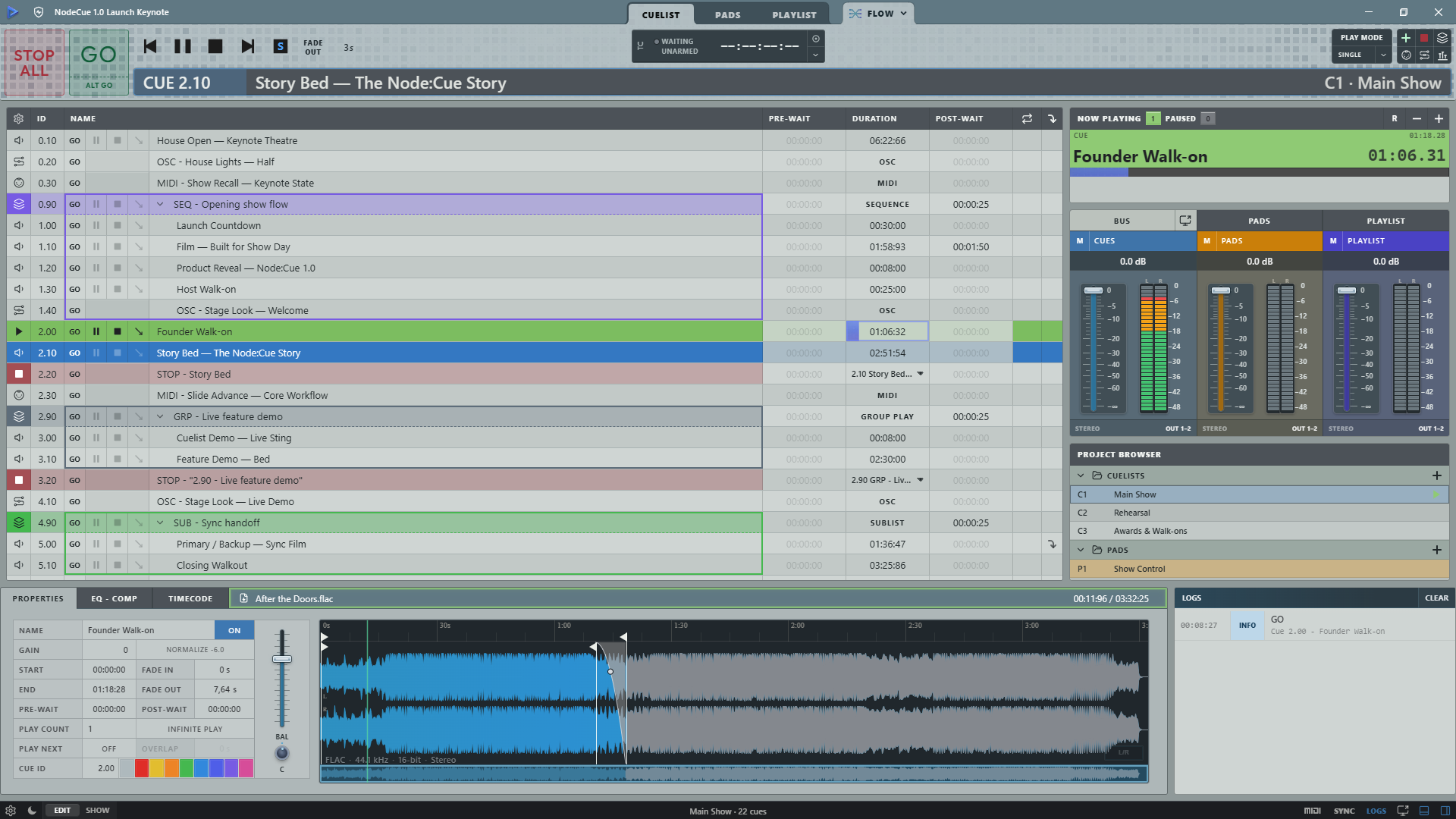
Build a cue sequence tailored to your show.

Arrange audio, MIDI, OSC, and Stop cues in the exact order they need to run, with waits, fades, and transitions where you need them.

  • Audio, Stop, MIDI, and OSC cues
  • Pre-wait, post-wait, loop, and play-next
  • Trim, fades, crossfades, EQ, and compression
Use / Planned cue sequence
Node:Cue Cuelist running the Node:Cue Launch Keynote with audio, MIDI, OSC, Stop cues, Now Playing, buses, and waveform editing
Actual Node:Cue interface / Cuelist

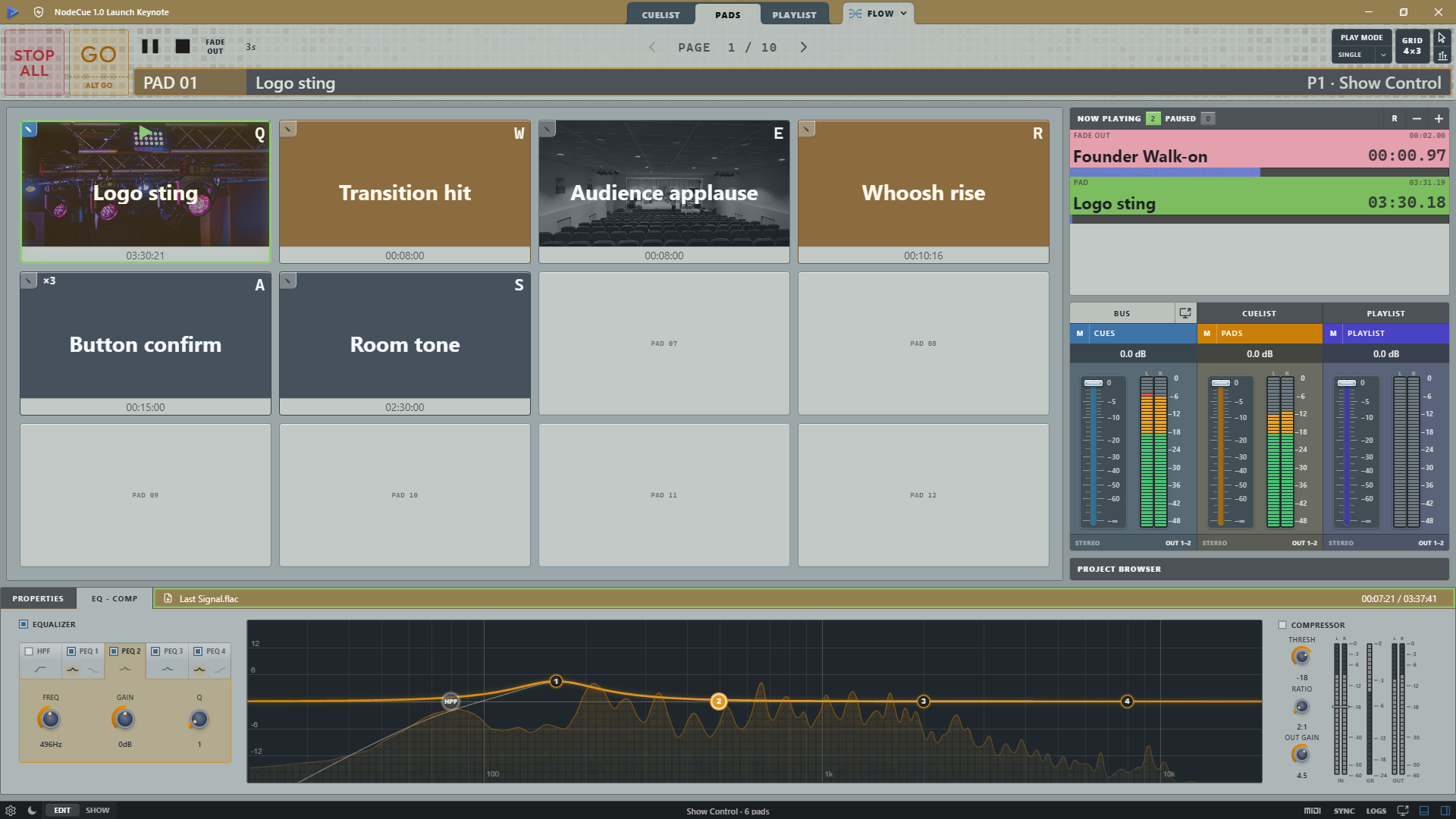
Keep your jingles ready to play.

Keep jingles, stings, and sound effects available outside the main cue sequence, ready to trigger whenever the show needs them.

  • Pages, custom images, colors, and hotkeys
  • Trigger jingles and sound effects without changing the planned sequence
  • Keep playback available for simultaneous live cues
Use / Jingles and sound effects
Node:Cue Pads with custom images, colors, hotkeys, simultaneous cue and pad playback, bus meters, EQ, compression, and live RTA
Actual Node:Cue interface / Pads

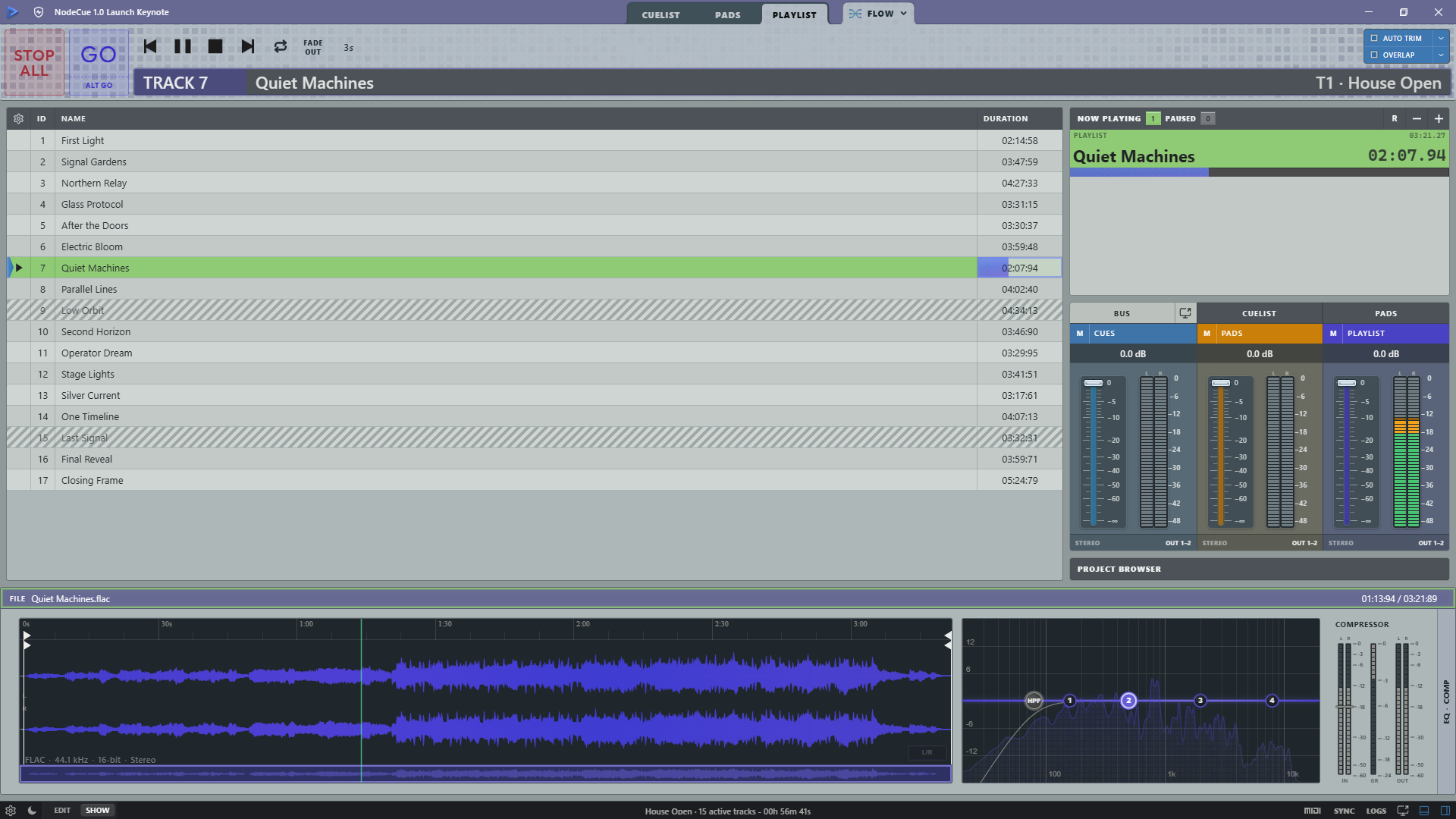
An integrated player for background music.

Play event ambience from tracks or Auxiliary In before, during, and after the show, without tying it to the Cuelist sequence.

  • Auto-trim and overlap for continuous background music
  • Random playback with a visible shuffled order and optional automatic reshuffling on loop
  • Resume playback from the same place after an interruption
  • Normalize tracks for a consistent playlist level
  • Bring in a physical input or route an external app through a virtual audio device, with controlled transitions to tracks
Use / Background music
Node:Cue Playlist playing Quiet Machines with auto-trim and overlap controls, Now Playing, bus meters, waveform, EQ, and compression
Actual Node:Cue interface / Playlist

Playback Flow / Cross-view control

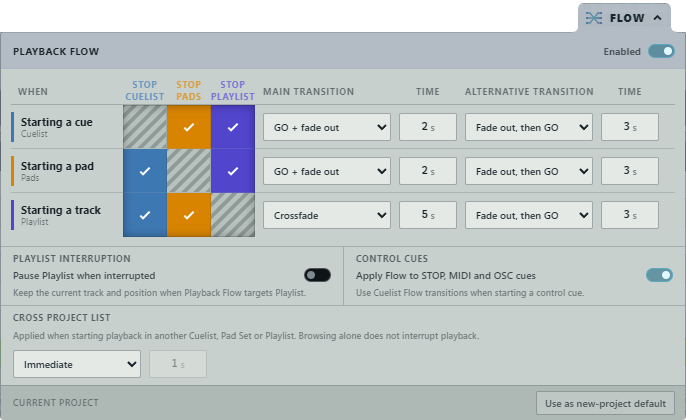
FLOW is at the core of Node:Cue.

Automate transitions between Cuelist, Pads, and Playlist for more precise and responsive sequences. FLOW manages what stops, what fades, and what keeps playing.

It reduces manual work at the mixing console by handling playback priorities and transitions between the three views.

Node:Cue Playback Flow showing transitions between players and Cross Project List settings
Playback Flow / cross-view transition rules

Audio routing

Route each playback view where it needs to go.

Each playback view has its own routable bus. Send each signal to its own audio device and channel mapping, then mix the three sources separately.

Bus 01 / Cuelist Planned cue sequence

The planned show sequence: audio, control cues, waits, and timed transitions in a precise order.

Bus 02 / Pads Jingles and sound effects

Playback outside the main sequence, from a jingle to an unplanned live cue.

Bus 03 / Playlist Background music

Event ambience for the time before, during, and after the show.

Primary / Backup Sync

Keep a second machine ready to take control.

Run the show from the Primary while a read-only Backup mirrors project changes, transport actions, and live playback over the production network.

Node:Cue / Primary
Operator control

The Primary instance accepts show commands and sends each committed action to the Backup.

Node:Cue / Backup
Live mirror

The Backup follows in read-only mode and plays locally in parallel. It is ready to take over if the Primary computer has a bad day.

Primary lost If the Primary computer loses power, gets unplugged, or otherwise drops out of the show, the Backup automatically leaves read-only mode and becomes an immediately operable Standalone instance, preserving current playback so the show can go on uninterrupted.

Audio-path switching remains under the operator's console, matrix, or hardware redundancy system.

Control surfaces

Control Node:Cue and external devices.

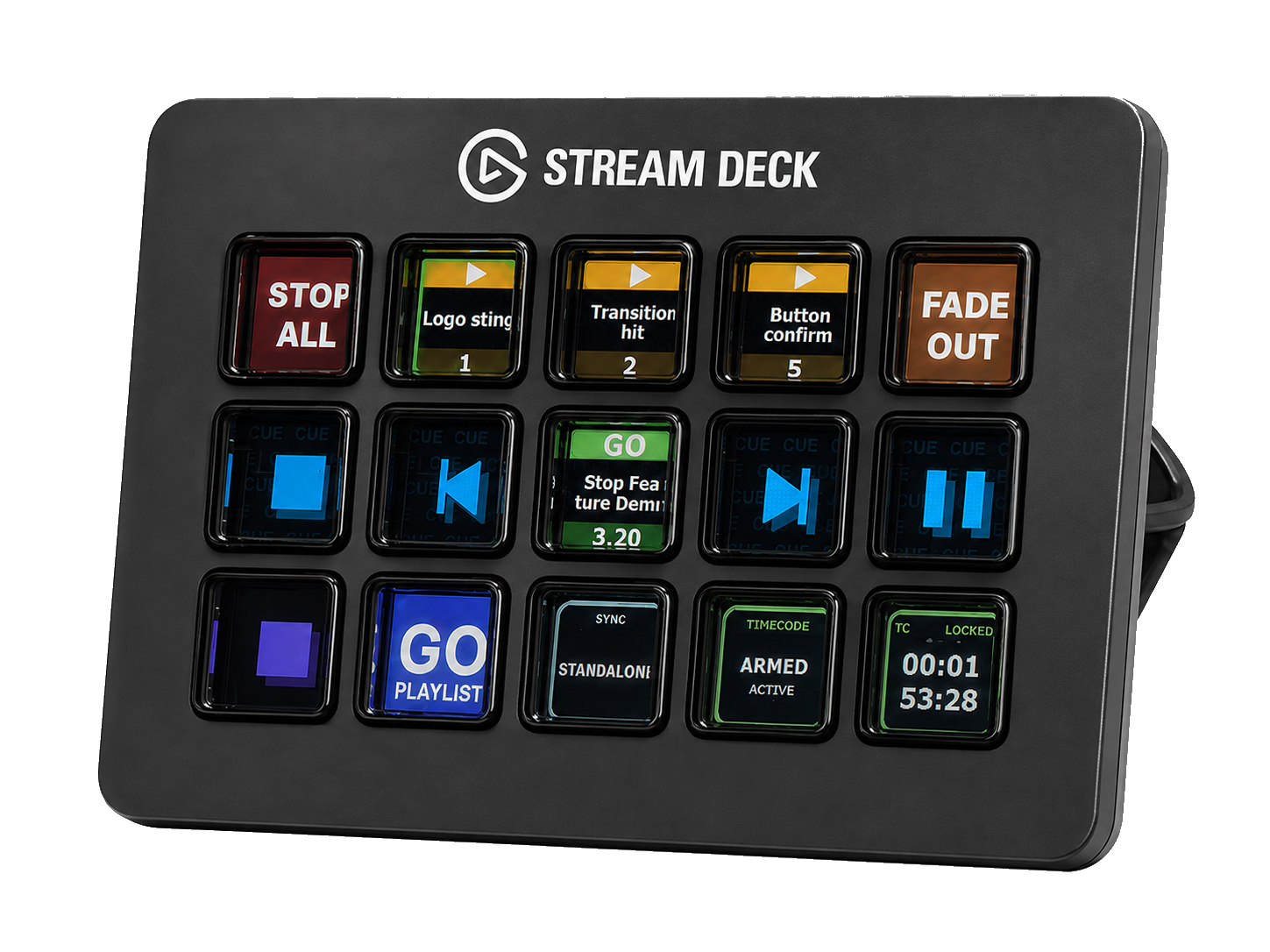
Send MIDI and OSC commands from Node:Cue to external devices, and receive MIDI and OSC input to control Node:Cue. The official Stream Deck plugin provides direct access to live controls and is available on Elgato Marketplace.

Stream Deck displaying the Node:Cue plugin: cue transport, pads, playlist controls, Sync status, and armed timecode.
MIDI
Send and receive MIDI control.

Use project patch points to route cues to local MIDI outputs, or use MIDI input to control transport, pads, cues, and application commands.

OSC
Send and receive OSC control.

Exchange control messages with devices and software over the production network. Project patch points keep cue routing separate from local OSC endpoints.

Keys
Control Node:Cue from the keyboard.

Assign shortcuts to transport, pads, cues, and application commands without changing the current view.

Deck
Get the official Node:Cue Stream Deck plugin.

Control cues, pads, playlists and AUX, with live feedback and grouped transport actions. Get it on Elgato Marketplace.

Free to use

Node:Cue is free to use.

Use the complete application without a subscription. An optional supporter license helps fund continued development.

Get supporter license

Node:Cue V1.1.0 / Windows x64

Node:Cue V1 is ready for your next show.

Download the official Windows installer for Node:Cue V1.1.0.

Download latest release